Plotting
All plotting code lives in dbac.plotting, separate from the physics, so the numerical modules
never import matplotlib. Everything is re-exported at the top level, so
from dbac.plotting import plot_single_energy_curve works for every function below.
What is where
module |
for |
main functions |
|---|---|---|
|
paper-ready fonts and figure sizes |
|
|
cooling-performance curves (the paper’s main plots) |
|
|
the hardware circuits A, B and C |
|
|
raw output of |
|
|
states and recursion trajectories on the Bloch sphere |
|
|
process tomography matrices |
|
|
DME accuracy versus Trotter steps |
|
Paper style
use_paper_style() sets the fonts, line widths and LaTeX rendering used in the paper. Call it
once, before plotting:
from dbac.plotting import use_paper_style, figure_size

use_paper_style(font_size=10, figsize=figure_size("PRD", "onecol"))
Warning
The paper style renders text with LaTeX (text.usetex), which needs a LaTeX installation.
Without one, use use_paper_style(use_tex=False). The examples on this page skip the paper
style so they run anywhere.
figure_size(journal, column) returns a (width, height) in inches matching a journal’s
column width ("PRD" one or two columns, "CQG").
Circuits
draw_dbac_circuit draws the three circuits run on the device. Each is described by a small
dict in DBAC_CIRCUITS; draw_circuit draws any circuit written in the same format.
from dbac.plotting import draw_dbac_circuit

draw_dbac_circuit("B");
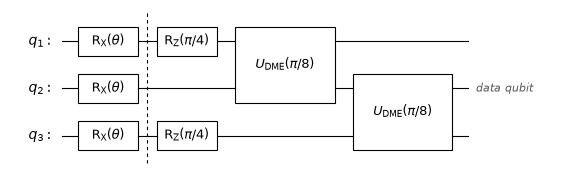
A circuit description lists the number of qubits, the data qubit (0-based), the columns after
which to draw a dashed barrier, and the gates as (column, qubits, label):
from dbac.plotting import DBAC_CIRCUITS

DBAC_CIRCUITS["A"]
{'n': 2,
 'data': 0,
 'barriers': [0],
 'ops': [(0, [0], '$\\mathrm{R}_\\mathrm{X}(\\theta)$'),
  (0, [1], '$\\mathrm{R}_\\mathrm{X}(\\theta)$'),
  (1, [1], '$\\mathrm{R}_\\mathrm{Z}(\\pi/4)$'),
  (2, [0, 1], '$U_\\mathrm{DME}(\\pi/4)$')]}
Cooling curves
plot_single_energy_curve makes one panel of the paper’s main figure: the energy of the
initial state, the energy after DBAC (labelled “Analytical”), and optionally experimental points.
import numpy as np
from dbac.dbqite import QITE_dme_select_M, H
from dbac.utils import rx_sweep
from dbac.plotting import plot_single_energy_curve

fractions = np.linspace(0, 1, 60)
theta = fractions * np.pi / 2
psis = rx_sweep(fractions)
E_initial = [(p.conj().T @ H @ p).item().real for p in psis]
E_after = [np.trace(QITE_dme_select_M(1)(p, np.pi / 4) @ H).real for p in psis]

plot_single_energy_curve(
    theta, E_initial, "M=1", E_after, color="#7a0085", marker="o",
    xticks=[0, np.pi / 4, np.pi / 2], xtick_labels=["0", r"$\pi/4$", r"$\pi/2$"],
);
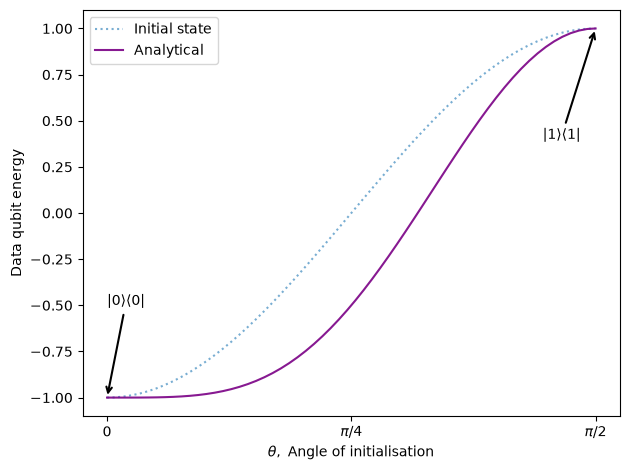
Pass experimental=(theta_points, energy_points) to overlay measured data as open markers,
as on the front page. To compare several configurations on one axis, use
plot_energy_vs_theta (energy) or plot_fidelity_fidelity (fidelity), which take a dict
{label: curve}.
Recursion output
plot_gci_results takes one or more tuples returned by GCI.execute_gci() and plots energy
(or, with mode="Fidelity", fidelity) against the accumulated evolution duration:
from dbac.gci import GCI
from dbac.dbqite import ideal_DME
from dbac.plotting import plot_gci_results

psi = rx_sweep([0.6])[0]
schedule = [np.pi / 4] * 4
ideal_DME.label = "ideal DME"     # legend label, read by plot_gci_results
plot_gci_results(
    GCI(QITE_dme_select_M(1), psi, None, schedule).execute_gci(),
    GCI(ideal_DME, psi, None, schedule).execute_gci(),
    target_energy=-1,
)
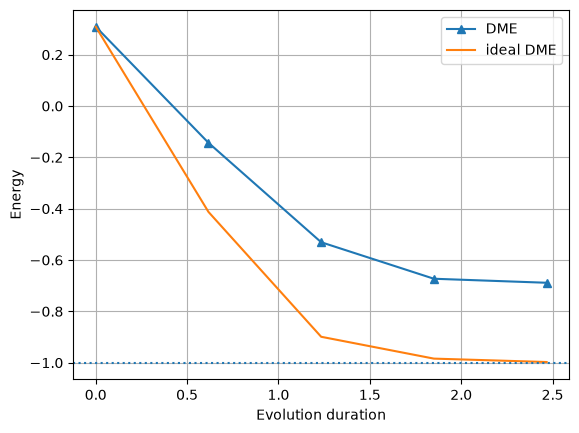
The legend labels come from the step functions themselves: steps from QITE_dme_select_M are
labelled “DME”, and any other function can be given a label attribute as above.
Bloch sphere
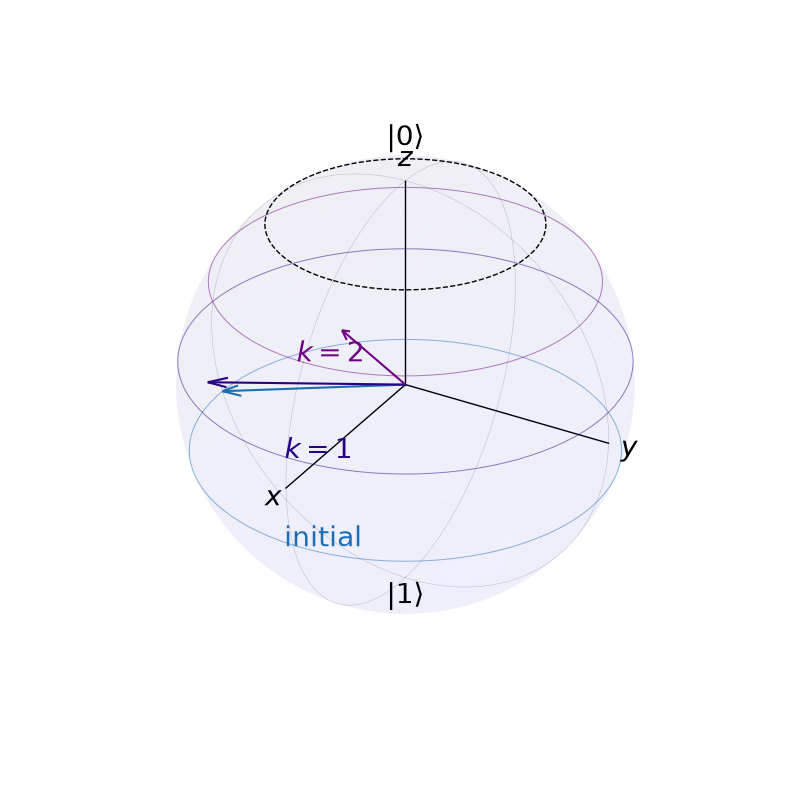
plot_bloch_trajectory draws each state of a recursion as a latitude circle on the Bloch
sphere. The colder the state, the closer its circle is to the north pole \(|0\rangle\):
from dbac.plotting import plot_bloch_trajectory

states = GCI(QITE_dme_select_M(1), psi, None, [np.pi / 4] * 2).execute_gci()[8]
plot_bloch_trajectory(states, ["initial", "$k=1$", "$k=2$"], target_fidelity=0.9);
Saving figures
Every function that creates a figure accepts save_path=; the figure is saved there, in the
format given by the file extension. The scripts in scripts/ save their PDFs to figures/
this way.